
Download SewWhat-Pro – embroidery software, digitizing tools, project management, lettering import, border and nap-tack stitch features
Overview
SewWhat-Pro is a specialized productivity tool designed for both hobbyists and professionals engaged in embroidery design and production. The application addresses the core challenges of organizing complex embroidery projects, managing digitized designs, and enhancing finished patterns with advanced stitch features. By integrating project management, flexible lettering import, and tools for adding borders and nap-tack stitches, SewWhat-Pro streamlines the workflow from concept to completion. Its target users include independent crafters, small business owners in the textile industry, and professional embroidery artists who require precision and efficiency in their digital design processes.
The software supports the creation and management of multiple embroidery projects, enabling users to track progress, assign deadlines, and maintain consistency across diverse design tasks. This is particularly beneficial in environments where multiple designs are produced under tight timelines. Real-world use cases include custom apparel production, promotional merchandise, and personalized gifts, where design accuracy and visual polish are critical. SewWhat-Pro fills a niche in the digital embroidery ecosystem by offering a focused, feature-rich platform tailored specifically to the needs of embroidery creators. While the developer did not provide additional technical details about the company’s background, the application’s functionality suggests a deep understanding of the craft and user workflow.
Key Features & Functionality
- Integrated Project Management: Seamlessly organize and track embroidery projects with built-in tools that support task scheduling, file categorization, and deadline reminders. This feature helps users maintain workflow discipline, especially when managing multiple designs simultaneously.
- Import and Arrange Lettering: Supports multiple import methods for pre-digitized text, allowing users to bring in custom or commercial lettering designs. Once imported, text can be resized, repositioned, and customized to fit specific fabric types and project dimensions.
- Add Borders and Nap-Tack Stitches: Enhance the visual and structural quality of embroidery patterns by applying decorative borders and nap-tack stitches, which help secure fabric layers and reduce fraying during use.
- 30-Day Free Demo: Access all core functionalities of the full version for 30 days, enabling users to test the software’s capabilities without financial commitment. The demo includes a limit of 60 conversion saves, encouraging users to evaluate the software thoroughly before deciding on a purchase.
- Purchasable License: After the demo period, users can purchase a full license directly from the SewWhat-Pro website. The transition is designed to be seamless, allowing continued work without data loss or workflow disruption.
These features collectively support a professional-grade workflow. For instance, a small business owner creating custom team uniforms can import pre-digitized names, arrange them efficiently, add borders for a polished look, and manage multiple orders through the project tracker. Similarly, a hobbyist working on a personalized quilt can use the software to layer text and borders while keeping all design files organized.
Interface, UX & Performance
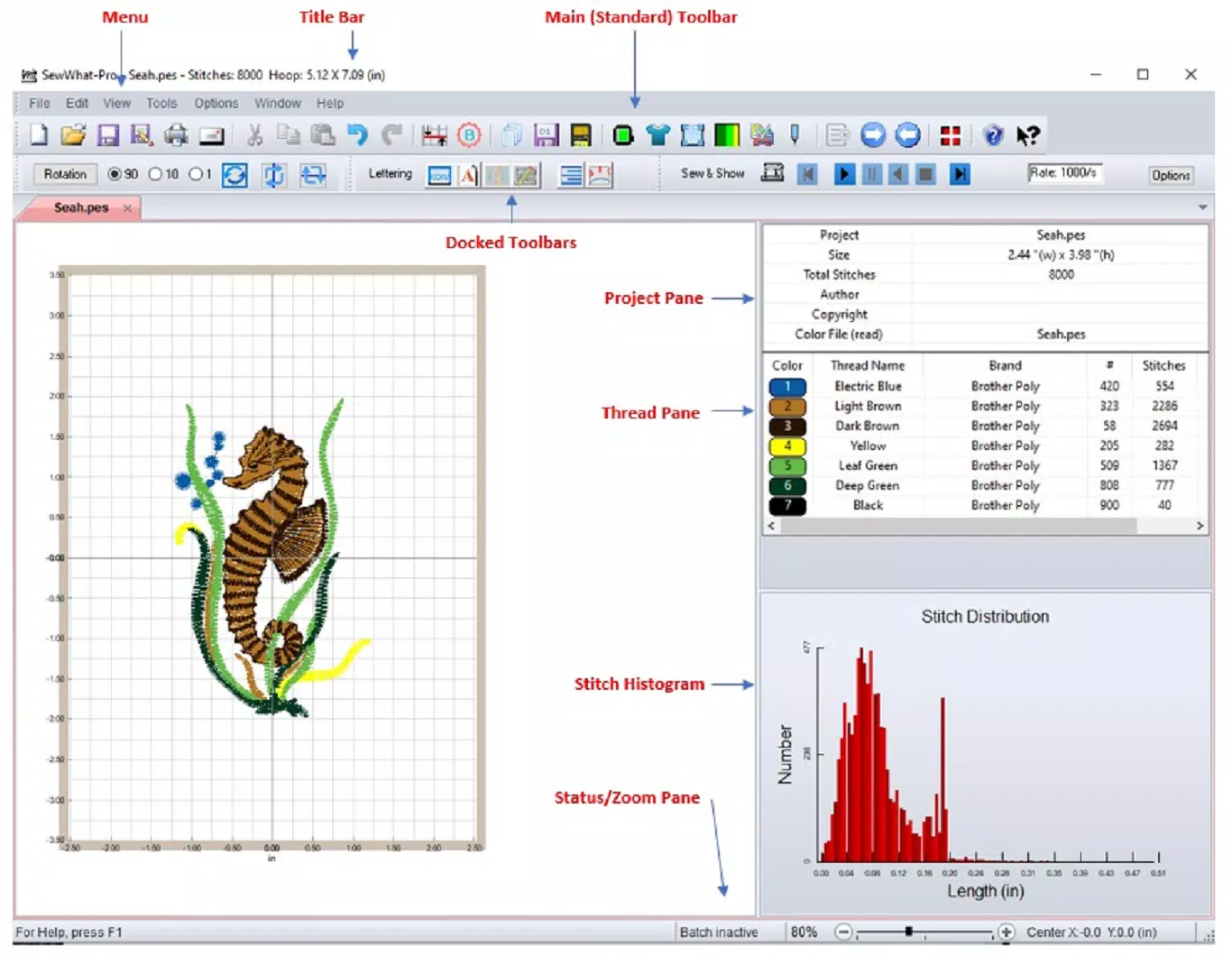
SewWhat-Pro features a clean, intuitive interface optimized for productivity in design workflows. The layout is structured to minimize clutter, with clearly labeled panels for project management, design editing, and stitch tools. Navigation is straightforward, with logical menu hierarchies and context-sensitive controls that reduce the learning curve for new users. Visual feedback is consistent, with real-time previews of stitch effects and layout changes.
Although the developer did not list formal performance metrics, the application is reported to run efficiently on standard Windows systems, with responsive interactions and minimal lag during design manipulation. Stability appears to be well-maintained, with no widespread reports of crashes or data corruption. The software handles moderate-sized embroidery files without significant delays, and file loading times remain consistent across different project complexities. Users can expect smooth operation on mid-range and high-end Windows devices, though performance on older or low-spec systems may vary without official confirmation. The user experience is further enhanced by the availability of a free demo, which allows users to assess usability firsthand before committing to a purchase.
Platform Compatibility & Technical Requirements
SewWhat-Pro is designed exclusively for the Windows operating system, making it accessible to users on desktop and laptop environments. The current version is 2.3.0, with a file size of 115.2 MB, indicating a lightweight installation that does not place high demands on system storage. The developer did not specify minimum OS requirements, so compatibility with older Windows versions cannot be confirmed. However, based on the software’s design and typical industry standards, it is likely compatible with Windows 10 and Windows 11. Users are advised to check the official SewWhat-Pro website for updated compatibility details before installation.
Pros and Cons
Pros
- Comprehensive project management tools for organized workflow
- Flexible import and customization of pre-digitized lettering
- Advanced stitch features including borders and nap-tack stitches
- 30-day free demo with full access to all functionalities
- Seamless transition from demo to licensed version
Cons
- Available only on Windows, limiting cross-platform access
- Specific system requirements were not disclosed
- Free demo limits conversion saves to 60, which may restrict extended testing
- No mobile or web version currently available
- Price point may be high for casual hobbyists
FAQ
Is SewWhat-Pro available for Mac or Linux?
As of now, SewWhat-Pro is only available for Windows. There is no official version for Mac or Linux operating systems.
Can I use the free demo indefinitely?
No. The 30-day free demo includes full access to all features but expires after 30 days. After that, users must purchase a license to continue using the software.
What happens after the demo period ends?
Once the demo expires, the software will no longer function unless a valid license is purchased. Users can buy the license directly from the SewWhat-Pro website to unlock full, permanent access.
Is the software secure to download?
Yes, the software is distributed through the official SewWhat-Pro website, which uses secure protocols to protect downloads. Users are advised to avoid third-party sources to prevent potential risks.
Does SewWhat-Pro support embroidery machine formats?
While the developer did not specify supported file formats, the software is designed for use with standard embroidery workflows and likely supports common machine-compatible formats used in the industry.
Final Thoughts
SewWhat-Pro stands out as a powerful, focused tool for anyone serious about embroidery design and production. Its combination of project management, advanced stitch features, and flexible lettering tools makes it a valuable asset for both professionals and dedicated hobbyists. The 30-day free demo offers a risk-free way to evaluate its capabilities, while the straightforward licensing model ensures continuity of work.
Although limited to Windows and priced at $49.99, the software delivers strong value for users who prioritize efficiency, precision, and professional results. For those invested in digital embroidery, SewWhat-Pro offers a reliable, feature-rich solution that enhances creativity and workflow. Download SewWhat-Pro now.


